The office manager who never goes home

Quotes. Bookings.
Deposits. Invoices.
Ask Shaz.

Every good Australian business has a Shaz. Or a Kaz, a Deb, a Bev, a Maz. The one in the office who knows every job, every price and every late payer, and runs the place while the owner is out on the tools. Most businesses can't afford one. This is Shaz as software. She answers the enquiry, checks your calendar, quotes in your prices, collects the deposit, writes the job sheet and raises the invoice, through your website, your inbox and by text, connected to the Xero and calendar you already use. For trades, caterers and venues.

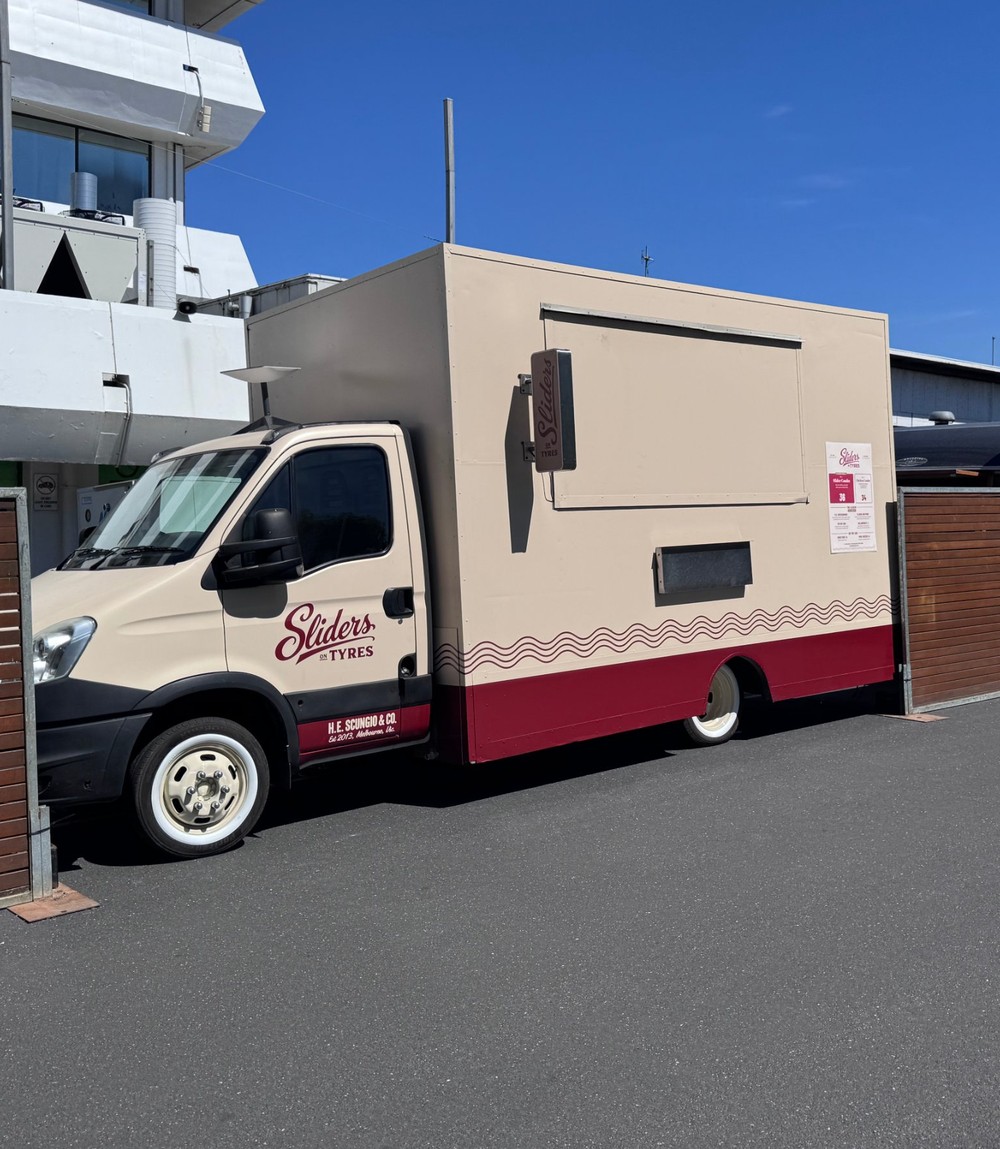
Developed inside Sliders on Tyres, a Melbourne catering business operating since 2013. Now available to other businesses.

Dean's Carpentry Shaz · replies in seconds
A real night

What happened while the owner was asleep.

Taken from a live booking. Times are real. The owner's phone did not ring once.

Enquiry arrives through the website: a work function for 80, Friday 11 December, Fitzroy.

Customer

Calendar checked. The date is free. The customer is asked what time food should be served.

Shaz

Itemised quote sent in the business's seasonal pricing, landed on the customer's budget, no discount.

Shaz

Customer says yes and gives a name, email and mobile.

Customer

Deposit invoice raised in Xero. Payment link emailed. Job sheet written into the team calendar. Owner notified.

Shaz

Deposit paid. Booking confirmed. Staff shift created in the rostering tool.

Shaz

Owner reads one summary message over breakfast.

Owner
How it works

Seven jobs Shaz does. In order.

Enquiry

Receives the enquiry

From your website, your enquiry inbox, or Facebook and Google messages. Asks only for details she does not already have.

Date

Checks the date

Reads your calendar and open quotes before confirming availability. Short notice jobs are referred to you first.

Quote

Prepares the quote

Your rates, minimums, seasonal pricing and travel. Every quote itemised. She never discounts.

Deposit

Collects the deposit

Raises it in Xero or Stripe and sends the payment link. The job is confirmed when the deposit is paid.

Job sheet

Writes the job sheet

Client, scope, times, address, access and contact, entered in the calendar your team already uses.

Staffing

Sets the staffing

Calculates people and vehicles from your rules, then creates the shift in your rostering tool.

Invoice

Follows up and invoices

Chases unpaid quotes, confirms final numbers, raises the balance invoice, requests a review after the job.

Anything outside your rules, a request for a discount, a short notice job, an unusual ask, is sent to you for a yes or no. You keep every decision without handling every enquiry.

Who it's for

Every business that books work on a date needs a Shaz.

Whether yours was called Kaz, Deb, Bev or Rhonda, you know what she did: answered the phone, knew the prices, chased the money, kept the diary. Shaz does all of it, at 2 am, for less than one lost job a year. One handrail pays for a year of her. One wedding pays for two.

Trades

Carpenters, plumbers, electricians, landscapers

Quote from your rates, book the job, schedule the crew, invoice on completion. No app to learn.

Caterers

Caterers and food trucks

Packages, minimum spends, seasonal rates, dietary requirements, travel, separate wedding pricing.

Venues

Clubs, RSLs, function rooms

Books the space, offers your preferred caterer, collects the deposit, writes the function sheet.

Suppliers

Hire, bars, entertainment, photography

The same process with different pricing. Built once, configured per business.

Where it comes from

Built in a working business, not a software office.

Sliders on Tyres has run two catering trucks across Melbourne since 2013. For most of that time the quoting, rostering and invoicing were done by hand, outside service hours. In 2026 each step was connected: the enquiry produces the quote, the quote raises the deposit, the deposit writes the job sheet, the job sheet creates the shift. Shaz is that process, given a name, packaged with your prices and your rules.

Sliders on Tyres truck at dusk

Sliders on Tyres, Melbourne. Every rule in Shaz was tested here first.

"Who's chasing that quote?" Ask Shaz.
"Has the deposit come in?" Ask Shaz.
"Is Saturday free?" Ask Shaz.

Shaz, Kaz, Deb, Bev, Maz, Rhonda. Every good Australian business has had one. Now every business can.

Not a receptionist

An AI receptionist answers the phone. Shaz runs the office.

There are a dozen AI phone answering products for tradies. They take a message or book a slot in your existing software, then stop. Shaz starts where they stop.

AI receptionist
Shaz
Answers the enquiry
Yes
Yes: web, email, messages and text
Checks your real calendar and open quotes
Sometimes
Yes
Quotes in your prices, minimums and seasons
No
Yes, itemised
Raises the deposit and sends the pay link
No
Yes, Xero or Stripe
Writes the job sheet for your team
No
Yes
Creates the shift in your roster
No
Yes
Raises the balance invoice and chases it
No
Yes
Built by someone who ran the business
No
Thirteen years of it
Pricing

Start with the chatbot. Grow into the office.

Four levels. A one-off setup fee, then a flat monthly fee. Every automation costs money each time it runs: every enquiry Shaz reads, every quote she writes, every calendar check, every text, every invoice raised. The monthly fee covers all of it, plus the hosting and monitoring, so there is nothing else to subscribe to and no usage bill arriving from a third party. Your Xero, your calendar and your payment account stay yours. All prices + GST.

Starter · the chatbot on its own
$1,500 setup $59 a month

Shaz on your website only. She answers questions, checks your calendar, builds an itemised quote from your price list and emails it to the customer and to you. You take it from there. No Xero, no rostering, no texts. For a business that wants to stop losing the enquiry that arrives at 9 pm, and nothing more yet.

  • Website chat widget in your colours, live in a week
  • Calendar check, so she never offers a date you are already booked
  • Itemised quote from your price list, emailed to you both
  • Up to 100 enquiries a month, hosting and AI included
  • Setup fee credited in full if you move up within 12 months
Essential
$3,900 setup

$99 a month, everything included

Shaz answers, quotes, takes the deposit and follows up. For a business that wants the whole front end handled, not just the first reply.

  • Website chat and enquiry inbox
  • Calendar and open quotes checked before any date is confirmed
  • Itemised quotes in your prices, minimums, seasons and travel
  • Deposit link through your Xero or Stripe
  • Quote follow-up by email at 3 and 7 days
  • Exceptions referred to you by email for a yes or no
  • Weekly summary to you

Included each month Up to 150 enquiries · unlimited email · hosting and monitoring · fixes to anything that breaks

Standard
$6,500 setup

$169 a month, everything included

Shaz runs the booking through to the day and bills it. For a business with a team to put on the job.

  • Everything in Essential
  • Job sheet written into your team calendar: client, scope, times, address, access, contact
  • Staffing and vehicles calculated from your rules, shifts created in your rostering tool
  • Final numbers confirmed, balance invoice raised in Xero
  • Facebook and Google messages connected
  • Daily summary to the owner, every morning

Included each month Up to 300 enquiries · unlimited email · hosting and monitoring · one rule change a month

Complete
$9,500 setup

$249 a month, everything included

The full system as it runs inside Sliders on Tyres. Shaz does the lot, by email and by text. Nothing waits for a person.

  • Everything in Standard
  • Her own text number for your business. Customers get her texts from it and can reply to it; your mobile stays yours. Quote sent, deposit received, day-before reminder
  • Quote chasing by text as well as email
  • Abandoned enquiry recovery, weekly
  • Review request by text after every job
  • Weekly invoice check so no job goes unbilled
  • Memory of every past quote, so repeat clients are quoted like repeat clients
  • Priority fixes within one business day

Included each month Up to 600 enquiries · 400 text messages · a text number for Shaz · unlimited email · hosting and monitoring · two rule changes a month

Over the included usage: $20 per additional 100 enquiries, $0.20 per additional text. Most businesses never reach the limit. Founding clients: the first three businesses receive Complete at the Standard setup price in return for allowing the installation to be documented as a case study.

Line by line

What each level does.

Starter is the website widget, the calendar check and the itemised quote, by email only. Everything below starts at Essential.

Enquiries and quoting
Essential
Standard
Complete
Website chat widget, in your colours
●
●
●
Enquiry inbox (email in, quote out)
●
●
●
Facebook and Google Business messages
–
●
●
Calendar checked before a date is offered
●
●
●
Open quotes checked so a date is never double-sold
●
●
●
Itemised quote in your rates, minimums, seasons, travel
●
●
●
Lands on the customer's budget without discounting
●
●
●
Quote follow-up by email, day 3 and day 7
●
●
●
Quote follow-up by text
–
–
●
Abandoned enquiry recovery, weekly
–
–
●
Booking and money
Deposit invoice raised in your Xero, or Stripe checkout
●
●
●
Booking confirmed only when the deposit is paid
●
●
●
Final numbers confirmed before the job
–
●
●
Balance invoice raised in Xero
–
●
●
Weekly check that every job has been invoiced
–
–
●
The day
Job sheet written into your team calendar
–
●
●
Staffing and vehicles calculated from your rules
–
●
●
Shift created in your rostering tool
–
●
●
Day-before reminder to the customer, by text
–
–
●
After the job
Review request after every job
–
Email
Text
Memory of past quotes for repeat clients
–
–
●
Daily summary to the owner
Weekly
●
●
Included in the monthly fee
Enquiries handled per month
150
300
600
Text messages per month
–
–
400
Text number for Shaz (customers reply to it, not to your phone)
–
–
●
AI usage, email sending, hosting, monitoring
●
●
●
Rule and price changes
Quarterly
1 a month
2 a month
Fixes when something breaks
3 business days
2 business days
1 business day
What the setup fee buys

Two to three weeks from first call to live.

The setup is where your business gets written down properly, most of it for the first time. Prices, minimums, seasons, travel, who does what on the day, what you say yes to and what you never do. That document is yours to keep whether or not you keep Shaz.

  1. Rules session A 90 minute call. We go through your last twenty quotes and jobs and pull out every rule you apply without thinking.
  2. Configuration Your prices, packages, add-ons, seasons, minimum spends, deposits, travel, staffing ratios and house rules written into Shaz's file for your business.
  3. Connections Your calendar, Xero or Stripe, rostering tool, email and, on Complete, a text number set up for Shaz. Nothing is moved; Shaz connects to what you already use.
  4. Test week Shaz quotes your real enquiries in draft. You read every one before it goes out. Rules get corrected until you stop correcting them.
  5. Go live The widget goes on your website, the inbox is switched on, and the first real quote goes out without you.
  6. Thirty-day review Every quote, booking and exception from the first month reviewed with you. Rules tightened. Then it just runs.
Why one fee

What the monthly fee pays for, and what it does not touch.

Covered by the fee

The running cost of every automation. Each one costs money each time it fires, and the fee pays for all of them: the AI that reads and writes every message. The text number Shaz sends from and every text sent on it. Email sending. The server Shaz runs on. Monitoring, so a failed connection is caught before you notice. Updates as Shaz improves. You never receive a bill from an AI company, a telco or a hosting provider.

Stays in your name

Your Xero and the money in it. Your Stripe account. Your Google or Microsoft calendar. Your rostering tool. Your website. Shaz connects to these with permissions you grant and can remove at any time. No customer payment ever passes through us.

If you leave

Thirty days' notice. You keep your rules document, your quote history and your customer list as a spreadsheet. The text number can be ported to you. The connections are removed. No lock-in beyond the fact that it works.

From the founder

I ran the admin of a catering business by hand for thirteen years. Quotes at eleven at night, rosters on a Sunday, invoices I forgot to send. The work was fine. The paperwork was what wore me down.

In 2026 I connected it all so it ran without me, and the first night a quote went out and a deposit came in while I was asleep, I knew every tradie and caterer I'd ever met needed the same thing. Not another app. A system that does the job and tells you when it's done.

Every business I've worked in had a Shaz, and the ones that didn't were a mess. This is her, for the businesses that can't hire one. It is priced so one good job pays for it. If it does not fit your business, I will tell you on the call.

Owen ScungioFounder, Shaz and Sliders on Tyres
Common questions

Asked on most calls.

Will it send a wrong quote?

She quotes only from your rules and your price list. She cannot invent a package or apply a discount. Anything outside the rules is referred to you. Most businesses start with quotes sent automatically and deposits approved by the owner, then remove the approval step once they are confident.

Does it read like an automated reply?

Try the demo and judge. She is built on Claude rather than scripted responses, and writes in your tone, taken from the rules session. She does not ask for information the customer has already given.

What do I need in place?

A website or Facebook page, a Google or Microsoft calendar, and Xero or Stripe for payments. If you roster in Connecteam, Deputy or Tanda, that is connected as well. If you do not have these, setup includes getting them in place.

Who owns the data and the accounts?

Your Xero, Stripe, calendar, rostering tool and website stay in your name, on your billing, and you can remove Shaz's access at any time. Shaz herself, the AI, the text number and the server, runs on our accounts and is covered by the monthly fee. Your rules document, quote history and customer list are yours and are handed over as files if you leave.

What does the monthly fee cover?

The cost of running the automations. None of this is free to run: every enquiry read, quote written, calendar checked, deposit raised and text sent costs money at the moment it happens. The fee covers all of it: the AI usage, the text messages and text number on Complete, email sending, hosting and monitoring. Also repairs when a connected tool changes something on its end, and the rule changes listed for your level. You will not receive a separate bill from an AI company, a telco or a hosting provider. It does not include phone support or new features built only for you; those are quoted separately.

Why is the monthly fee higher than a basic chatbot?

Because it includes the running costs. A chatbot subscription at $49 usually leaves you paying for the AI, the texts and the integrations on top, through three other accounts you have to manage. One fee, one invoice, one person responsible when something stops.

Next step

Book a 20 minute call.

Tell us how you quote and book today. We will tell you whether Shaz fits your business and, if she does, what the installation involves.

Thank you. We will be in touch within one business day.

Or email owen@askshaz.com.au · 0439 994 608